The Best Gadget For Blogger
Archive for 2012
Add Digg Button

Log in to your blogger account
Go to edit html
Make sure to back up your template first
Now find this
<data:post.body/>
Immediately before that paste this code
<!-- DIGG -->
<div style='float:right;'><script type='text/javascript'>digg_url = '<data:post.url/>';</script><script src='http://digg.com/tools/diggthis.js' type='text/javascript'/></div>
Then Save.

Dancing Links and Pictures
Log in to your blogger account
Go to Edit Html
Make sure to Backup template first
Now find this code
</head>
Immediately before that paste this code
<!--DANCING-NUDGE-LINKS-STARTS-->
<script src='http://code.jquery.com/jquery-latest.js' type='text/javascript'/>
<script type='text/javascript'>
$(document).ready(function() {
$('a.nudge').hover(function() { //mouse in
$(this).animate({ paddingLeft: '20px' },400);
}, function() { //mouse out
$(this).animate({ paddingLeft: 0 }, 400);
});
});
</script>
<!--DANCING-NUDGE-LINKS-STOPS-http://bloggerstop.net-->
How it works?
Go to Edit Html
Make sure to Backup template first
Now find this code
</head>
Immediately before that paste this code
<!--DANCING-NUDGE-LINKS-STARTS-->
<script src='http://code.jquery.com/jquery-latest.js' type='text/javascript'/>
<script type='text/javascript'>
$(document).ready(function() {
$('a.nudge').hover(function() { //mouse in
$(this).animate({ paddingLeft: '20px' },400);
}, function() { //mouse out
$(this).animate({ paddingLeft: 0 }, 400);
});
});
</script>
<!--DANCING-NUDGE-LINKS-STOPS-http://bloggerstop.net-->
How it works?
For links
<a href="Your URL" class="nudge">Text Here!</a>
Move Mouse Here!
For images
<a href="Image URL" class="nudge"><img src="Image Url"/></a>

<a href="Your URL" class="nudge">Text Here!</a>
Move Mouse Here!
For images
<a href="Image URL" class="nudge"><img src="Image Url"/></a>
New Blogger Stats
Introducing Blogger Stats
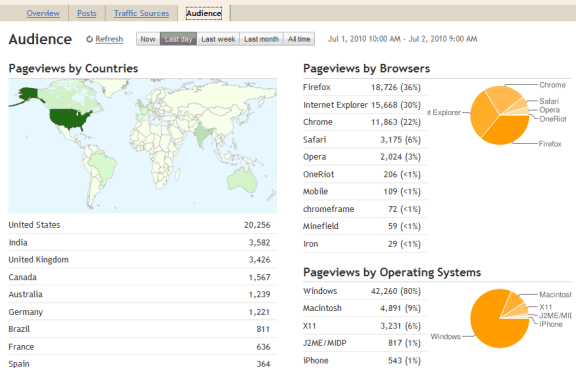
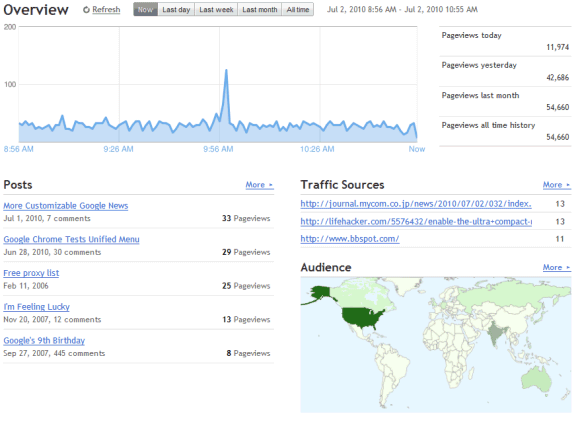
Just in time for our eleventh birthday, we are excited to introduce Stats for Blogger. First launched to Blogger in Draft back in July, Blogger Stats is a cool real-time stats service that's fully integrated with Blogger; you don't need to do anything to enable it for your blog. You can find the new Stats tab on your blog’s dashboard—go ahead and take it for a spin!
Feature Highlights
Stats is an important piece of the blogging puzzle, as it allows you to track your blog's traffic and find out exactly what your audience is looking for. As such, integrated, real-time stats has been one of the most frequently requested features from our users. You can find more information about Blogger Stats in our earlier announcement; meanwhile, here are some quick highlights for you.
* Real-time tracking. Each time your blog is viewed, you can see the change on your stats almost immediately
* Insights about your audience. Top search keywords, countries, browsers, and more
* Great user interface. Beautiful, easy-to-read graphs and charts
Updates
After our initial launch to Blogger in Draft, we had some very helpful feedback and suggestions from you. Based on them, we’ve made improvements including the following:
* Self-view exclusion. Some of you wanted Blogger Stats to exclude your own pageviews, and now there’s an option for that: On Stats | Overview, click on the “Don’t track your own pageviews” link (it’s on the right side, under the pageview summary) and select the “Don’t track my pageviews” option. We’re also now excluding traffic coming from Blogger admin pages and post Preview, providing more accurate pageview data.
* More effective bot traffic filtering. We’ve made several improvements to detect “bots” (the non-human visitors, such as crawlers) including extending our list of known “bots” to provide more accurate pageviews from real visitors.
* Internationalization. Blogger Stats is now available in more than 40 languages.
We hope you like Blogger Stats. By the way, there must be something good about August—not only is it our birth month, we’ve gone from four Admin Dashboard tabs to six, just this month alone! (The other new tab we’ve added this month was the Comments tab, which was another highly requested feature.) We still have some more ground to cover, but just wanted to say we’re working really hard to deliver the features you’ve wanted to see on Blogger. Looking forward to seeing you all at the upcoming Meetup!

Infolinks on Blogger
Puting Infolinks to your blog will increases your revenue to your blog provided you have lot of traffic to your blog.
Go to Infolinks.com
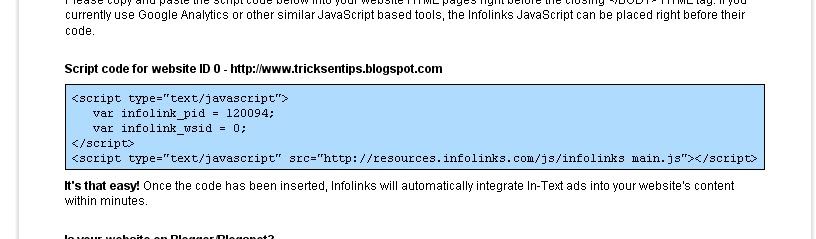
Register there and finally when you get the ad code copy that.
See Image Like this:
Login to your Blogger
Click on Layout.
Then click on Edit HTML.
Find </body>
Paste the code given by Infolinks to you just before the body tag.
Click on Layout.
Then click on Edit HTML.
Find </body>
Paste the code given by Infolinks to you just before the body tag.
Remember!
It takes 2 business days(all days in the week except saturday and sunday)
It takes 2 business days(all days in the week except saturday and sunday)
For the infolinks ads to appear on your blogger blog.
It will appear if is accepted.


